Departures / Microsoft
Is Ask Copilot in Windows 11 Click to Do available in the EU? Not yet. Included in the June security update on 10 Jun 2025, 513 days ago, and is still not available in the EU. Last checked 5 Nov 2026.
Ask Copilot in Windows 11 Click to Do
Not available in the EU
Day 513.days since: included in the june security update
Who is left outThe whole EEA, and China. So every EU country, plus Norway, Iceland and Liechtenstein. Microsoft names only the EEA and China, so the UK and Switzerland are not left out by this page. Click to Do itself reached the EEA on 28 May 2025; the Ask Copilot action did not, and neither did visual search with Bing or Draft with Copilot in Word. This only concerns Copilot+ PCs and eligible Cloud PCs.
Clock started10 Jun 2025. Ask Copilot arrived as a new Click to Do action in the optional update of 28 May 2025, as a gradual rollout. The security update of 10 Jun 2025 includes that update, so we count from that day. Microsoft's page for it does not name Ask Copilot; Windows Latest does.
Next milestoneDay 600 on 31 Jan 2027
Last checked5 Nov 2026 · 6 sources
Why not yet?
Reason givenNo reason given. In May 2025 Microsoft said "Coming later to the European Economic Area". It has not given a date.
About this timer
- Microsoft Support: Click to Do, regional variations (read 5 Nov 2026)
- Microsoft Support: 28 May 2025, KB5058499 preview (Ask Copilot, and Click to Do reaches the EEA)
- Microsoft Support: 10 Jun 2025, KB5060842 security update (includes KB5058499)
- Microsoft Support: 28 Oct 2025, KB5067036 preview (newer Copilot actions in Click to Do also exclude the EEA)
- Thurrott: Windows 11 version 24H2 gets a feature-packed optional update (29 May 2025)
- Windows Latest: KB5060842 is out, with Ask Copilot in Click to Do (10 Jun 2025)
How we checked this
- “European Economic Area (EEA) region Search the web : Uses Microsoft Edge and Bing to perform searches. Visual search with Bing : Not available. Remove background with Paint : Advanced image features like Blur, Remove, and Erase are currently not available. Ask Copilot : Not available.” on Microsoft Support: Click to Do, regional variations, seen 5 Nov 2026 (a page the company keeps updated)
- “Coming later to the European Economic Area.” on Microsoft Support: 28 May 2025, KB5058499 preview, seen 5 Nov 2026 (a dated page, which will not change)
- 5 Nov 2026 Fixed "launched" and "went out generally"; dated update notes no longer called live; who is left out names China.
- 5 Nov 2026 New timer. Microsoft's Click to Do support page read today lists Ask Copilot as not available in the EEA. The 28 May 2025 update notes say "Coming later to the European Economic Area". Start date is the 10 Jun 2025 security update, which includes that update. English, French and German searches and a scan of Windows update notes from Sep 2025 to Oct 2026 found no sign it has reached the EEA. Microsoft gives no reason on these pages.
Know the day it arrives
Follow the free arrivals feed in any RSS reader. No sign-up.
Put this count on your site
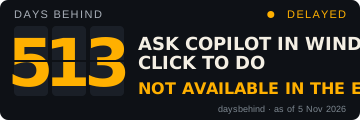
Free for articles and blogs. It links back here. The count is correct on the date printed on it, and refreshes when the site is updated. Paste this code:
Also on the board
- GDPR3,086 days
- The end of clock changes2,781 days
- The bottle cap that won't come off855 days
- iPhone Mirroring on Mac780 days